When SEO traffic grows but leads do not, the problem is rarely the amount of traffic. It is a leak at one stage between the search result and the sale: the click, the page, the offer, or the follow-up. Compare impressions, clicks, enquiries, qualified leads, and sales side by side, find the first stage where the numbers stop rising together, and fix that stage before you publish another post.
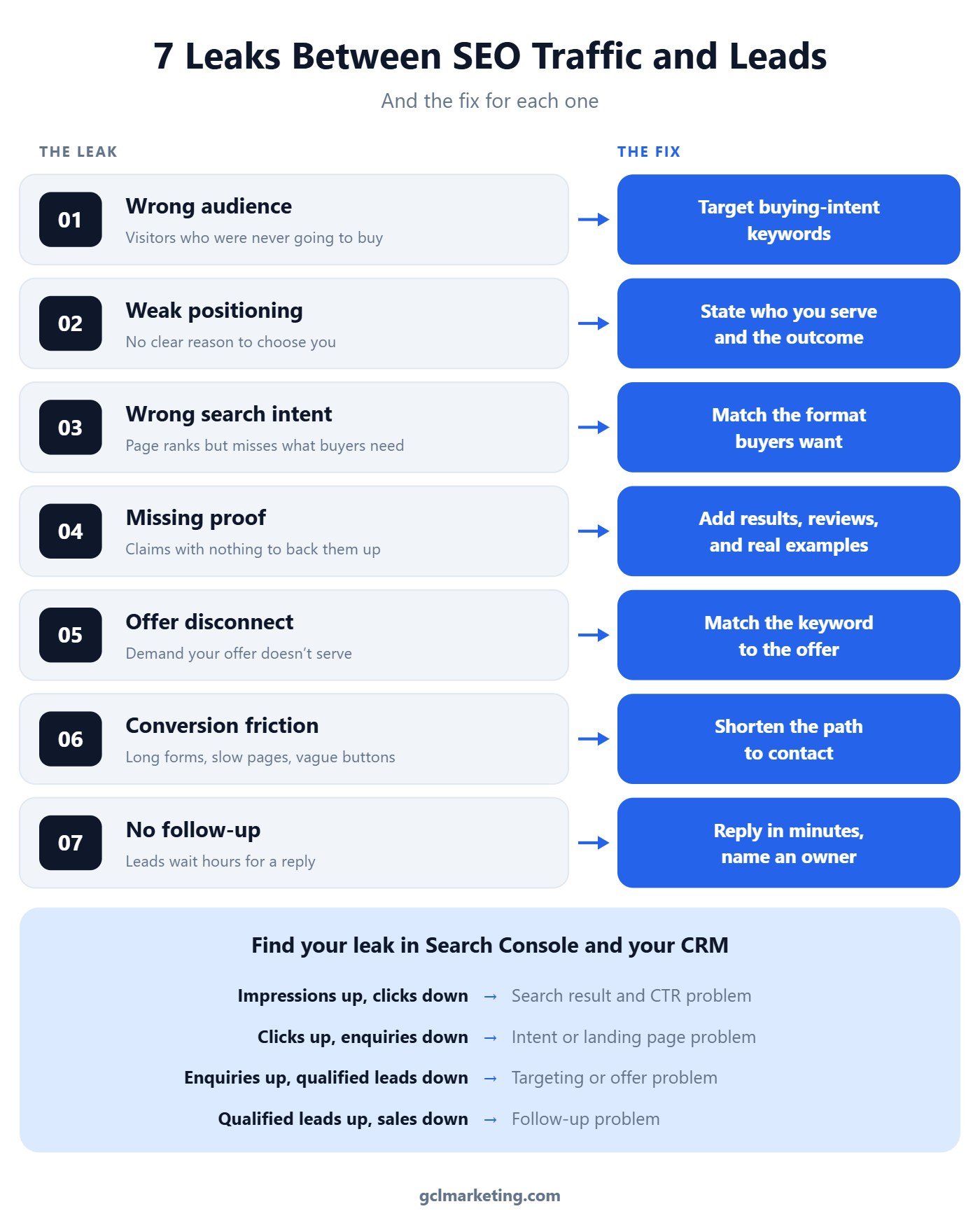
Why more traffic does not fix a lead problem
Traffic is an input, not an outcome. First Page Sage benchmarks put the average B2B SEO conversion rate at around 2.6%, which means most organic visitors never become a lead even on a healthy site. If your rate sits well below that, doubling traffic mostly doubles the number of people who leave.
The useful question is not “how do we get more visitors?” but “where do the visitors we already have drop out?” Each leak below has a different cause and a different fix. Treating them as one vague conversion problem is how teams end up redesigning a homepage when the real issue is an unanswered contact form.
Leak 1: Wrong audience
Traffic comes from people who were never likely to buy. Informational “what is” keywords bring students, researchers, and competitors, so a page can carry thousands of visits and almost no buyers.
How to fix it: Shift effort toward keywords with buying intent, the ones that include a service, a location, a price, a comparison, or words like “hire”, “near me”, and “cost”. In Search Console, sort your landing pages by clicks and mark which queries a buyer would actually type.
Leak 2: Weak positioning
Visitors land and cannot tell in a few seconds why they should pick you. If your headline could sit on any competitor’s site unchanged, it is not doing its job.
How to fix it: Rewrite the first screen of each top page to answer three things: who you serve, the outcome you deliver, and what makes you different. Read it out loud with a competitor’s name swapped in. If it still works, it is too generic.
Leak 3: Wrong search intent
The page ranks, but it does not match what the searcher came to do. Someone searching “emergency plumber near me” wants a phone number in the first screen, not a long guide.
How to fix it: Search your target query and study the top results. If they are service pages, do not try to rank a blog post; if they are comparisons, publish a comparison. Then put the next step a buyer needs, a call button, a quote form, or pricing, where they see it without scrolling.
Leak 4: Missing proof
Claims without evidence stall buyers at the moment they decide. “Proven results” and “trusted experts” mean nothing without something to back them up.
How to fix it: Add proof next to the claim it supports: a real result with a number, a named review, a screenshot, or a short case example. Only use proof you can verify. One honest, specific result beats five vague ones.
Leak 5: Offer disconnect
The page attracts demand your offer does not serve. A post ranking for “free SEO tools” pulls in people who want free tools, not an agency retainer, so the enquiries that do come in rarely qualify.
How to fix it: Line up each high-traffic page with an offer that fits its audience. Either retarget the page to a keyword that matches what you sell, or give that audience a matching first step, such as a free audit for a tools audience.
Leak 6: Conversion friction
The visitor is ready, and the page gets in the way. Long forms, broken mobile layouts, slow load times, and buttons that do not say what happens next all lose buyers who wanted to talk.
How to fix it: Test every form and button on your phone. Cut forms to the fields you truly need, add a click-to-call option, and change vague buttons like “Submit” to say what happens next, such as “Get my free quote”.
Leak 7: No follow-up system
This is the most expensive leak because the visitor already raised their hand. Lead response research from InsideSales and Dr. James Oldroyd found that contacting a lead within 5 minutes made it about 21 times more likely to qualify than waiting 30 minutes. A Harvard Business Review analysis found companies that reached out within an hour were nearly seven times more likely to qualify the lead than those that waited longer.
How to fix it: Name one owner for new enquiries, set a reply-time target, and send an instant confirmation so the lead knows a real reply is coming. Track median response time every week, the same way you track rankings.
What about the clicks you never get?
Some leaks start before anyone reaches your site. Seer Interactive found organic click-through rate on queries showing an AI Overview fell from about 1.76% to 0.61%, and Ahrefs measured a 58% drop in clicks to the top-ranking page when an AI Overview appears. If impressions climb while clicks stay flat, the problem is the search result, not the page.
Seer also reported that brands cited inside an AI Overview earn noticeably higher organic CTR than uncited brands on the same queries. That is where SEO, AEO, and GEO stop being separate projects, which is why we treat them as one framework, not three services. Our guide to the Search Console AI report shows how to spot this in your own data.
How to diagnose your leak in 30 minutes
Put five numbers for the same period in one row: impressions and clicks from Search Console, enquiries from your forms and calls, qualified leads from your CRM or inbox, and closed sales. Then read the first stage where one number rises while the next one falls.
- Impressions up, clicks down. A search result problem. Rewrite titles and meta descriptions on your highest-impression pages and check which queries now show an AI Overview.
- Clicks up, enquiries down. A page or intent problem. Compare each top landing page against the format of the pages ranking above it, and put the call to action in the first screen.
- Enquiries up, qualified leads down. A targeting or offer problem. Tag every enquiry by landing page and cut or retarget the pages that send unqualified leads.
- Qualified leads up, sales down. A follow-up problem. Set a reply-time target, name one owner for new enquiries, and track median response time weekly.
- Fix one stage at a time. Note the date of each change and give it two to four weeks before judging, so you know which fix moved the number.
The bottom line
Rankings and traffic are early signals, not results. Most sites with flat leads already have enough visitors; they lose them at one stage that nobody is measuring. Find that stage, fix it, and every future ranking gain is worth more.
If you want help finding where your search traffic leaks, our SEO services connect rankings, AI visibility, and lead tracking in one plan. You can also see how we run SEO, AEO, and GEO as one strategy on our homepage, or browse more articles by topic.
What is a good conversion rate for SEO traffic?
It depends on industry and the action you count, but First Page Sage benchmarks put average B2B SEO conversion at around 2.6%. Compare your own pages against each other first, since your best page shows what your site can do.
Why is my organic traffic growing but my leads are not?
Usually the new traffic comes from informational queries with little buying intent, or your pages, offer, or follow-up are losing visitors at a specific stage. Map the funnel stage by stage to find where the numbers split.
Do AI Overviews reduce leads from SEO?
They reduce clicks on many informational queries, which can lower traffic. Buying-intent queries and pages cited in AI answers hold up better, so focus on being the cited source and on converting the visitors who do arrive.